






Sales & Retail Execution: turn strategy into shelf reality.
Your commercial strategy is only as strong as what actually happens at the shelf.
Sales & Retail Execution is the retail execution platform that runs the whole visit cycle — plan, execute, review — so every field visit turns your strategy into measurable in-store results.
Why does strategy stall at the shelf?
Your range, pricing, promotions and shelf standards are all set at head office. Whether they actually happen — store by store, the way you planned — comes down to the rep in the aisle, and it’s the hardest part of the operation to see. Markets differ, and much of a rep’s day still goes to driving and admin, so execution quality drifts between stores and head office often finds out too late.
You can’t steer what you can’t see.
What is Sales & Retail Execution?
Sales & Retail Execution is the software a consumer-goods field team uses to run everything that happens inside the store — the right range on shelf, at the right price, with promotions and displays up and correct. Reps work it on a tablet across the whole visit cycle: plan the call, execute at the shelf, review what happened. So the commercial strategy set at head office actually lands in each store, and every visit comes back as data you can act on.
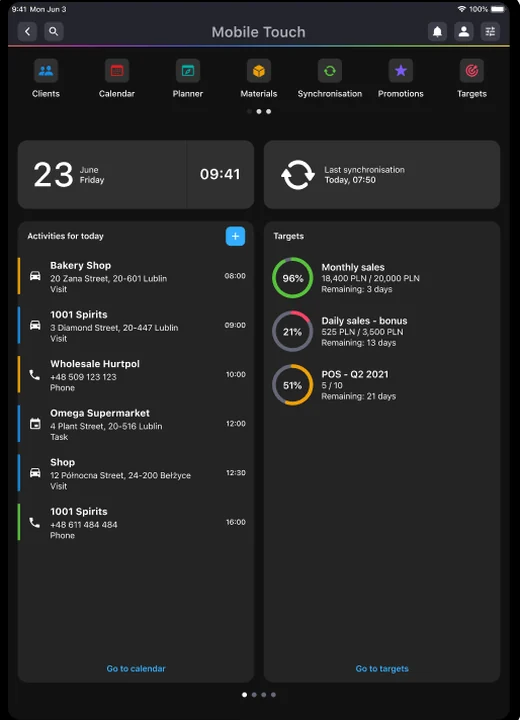
How it works · the visit cycle
Step into the rep’s day
One visit runs as four phases, and the same cycle repeats in every store. Below, walk a rep through it end to end — or jump straight to the phase you want.
Phase 1
Prepare
Know which stores matter, the best route, and what to do in each.
Phase 2
Execute
Work the shelf: merchandise, run checks, and fix what’s off on the spot.
Phase 3
Sell
Win the order and the bigger deal, using what you just saw.
Phase 4
Review
See what actually drove the sales, and act while it still counts.
Visit planning
Build a day in the field that actually holds up
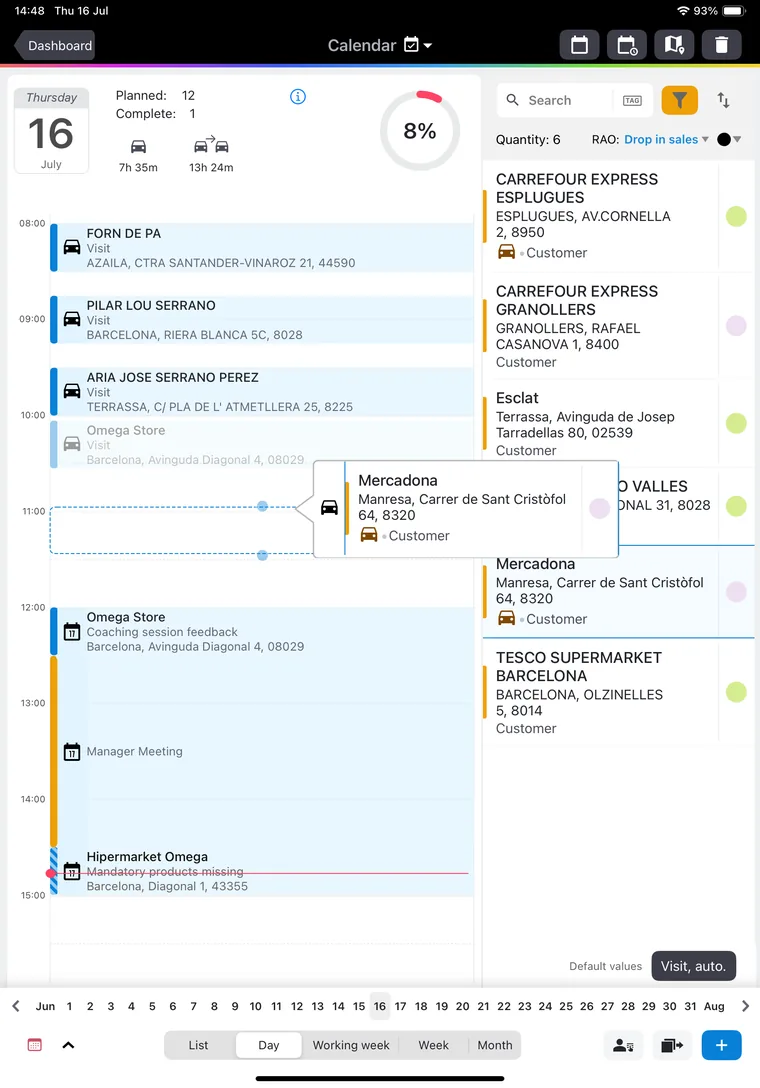
Visit planning is how a rep decides who to visit and when. They build the days ahead from the customers they look after, so their time in the field lands on the right stores at the right moment.
Select several customers for a single day and the plan arranges them automatically, spread across the working day. It accounts for the travel time between stops and the visit length each customer needs — a shorter stop at a small store, longer at a big one — so the day is realistic before the rep sets off.
- Plan by what matters. Choose who to see by segment, area or time since the last visit, so the plan follows your priorities.
- See who’s due. The plan knows how often each outlet should be visited and colour-codes the ones slipping behind, so coverage holds and nobody is quietly missed.
- The whole day in one view. Visits plan alongside the meetings and calls the rep already has, so there’s no jumping between tools and the plan reflects a real working day.
Retail Activity Optimization · RAOPOI Best-in-Class
See which stores need attention, and why
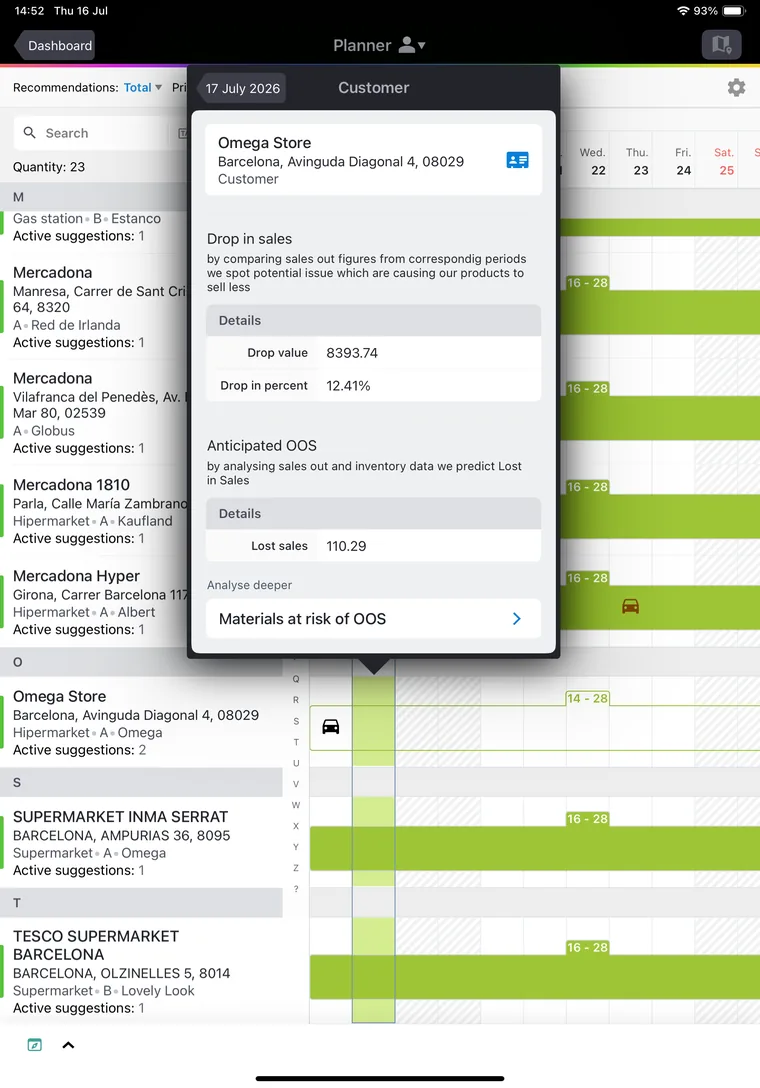
Retail Activity Optimization (RAO) is the AI that ranks your stores by which ones need attention right now, and shows why. It reads the signals that matter for each customer — a drop in sales, a looming stock-out, slipping category share — and turns them into one live priority per store, with the corrective action ready for the visit.
RAO also plots priorities across the days ahead, so you can see whose priority is rising and when, and which stores fall close to a route the rep is already running. An urgent one then gets picked up on the way, without a separate trip.
- Every priority comes with its reason. You see the exact drop in sales, or the money at risk from a stock-out.
- Weighted to your priorities. You choose which signals count and how much.
- Part of Asseco Platform Genius. The AI layer that runs across the whole platform.
Route optimization
Turn a day’s visits into the shortest drive
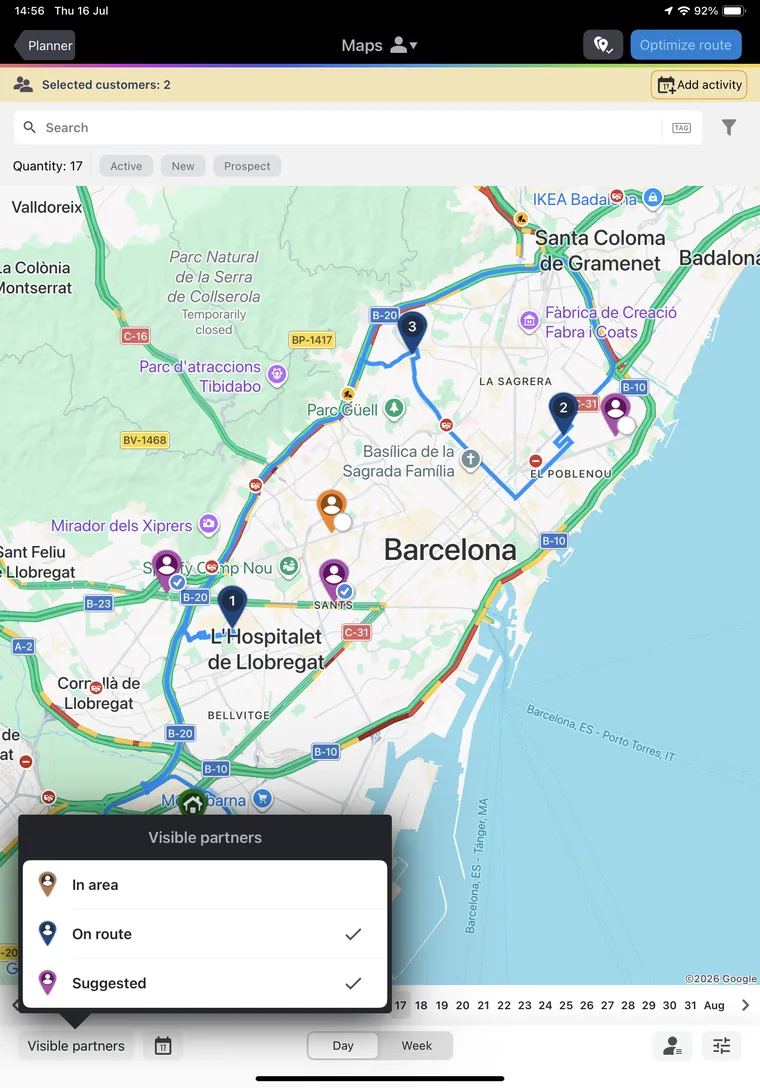
Route optimization turns a day’s chosen visits into the shortest, most efficient drive. One tap sets the order, so reps spend less time on the road and more of the day in front of customers.
The route keeps up when the day changes. If a customer cancels or the rep squeezes in a new stop, one more tap reworks the drive around it, so the day stays efficient without anyone re-planning it by hand.
- Real roads, real traffic. The order accounts for actual distances and current traffic, so it holds up on the ground.
- A shorter way home. The last visit is set closest to where the rep lives, so the day also ends without a long drive back.
- Beyond a single day. To plan routes across the whole visit cycle, see Dynamic Route Optimization.
Targets
Set a target on any goal, down to the single visit
Targets can cover any part of the job you want to steer: order value, distribution, visit coverage, survey quality, contracts, even Perfect Store scores. Each one runs on data from the platform or integrated from outside it, like a distributor’s own invoices, so the goal reflects the full sales picture. Together they form one plan, tailored to how your sales force works.
The target reaches the individual visit, sized to what that store can realistically buy. The plan cascades down — region, rep, customer, visit — using each outlet’s own potential, so a rep opens every call with a concrete, achievable number and sees the result the moment the visit ends.
- Any goal, one mechanism. Sales, distribution, field activity, survey quality, contracts and KPIs, set on the platform’s data or on external sales data integrated in.
- Down to the customer and the visit. Goals cascade by region, rep, customer, even the single visit, each sized to that outlet’s potential.
- Live on the rep’s screen. A daily target at the start of the day, a per-visit result the moment a call ends, and, where you turn it on, a ranking against the team.
Budgets
Cap the giveaway, right where it’s spent
Budgets control the money and free goods a rep can give away in the field: discounts, gifts, POS material, the cost of a promotion. You set them by value or by quantity, for a period, and the platform holds the line as the rep works. A budget can cascade down the organisation, from a region to a single rep, or a region can share one pool; on a central chain deal, the budget sits with the key account manager who owns it.
The limit is live at the moment of spend. As the rep builds an order or runs a promotion, the budget left shows right on the line and draws down as they commit it, so nobody gives away money that isn’t there. Unused budget can roll into the next period.
- By value or by quantity. Cap a discount’s value, or a count of gifts, samples or POS items — by period, by customer, even by day.
- Cascaded, or shared. A central budget splits down by region, team or rep, or a region shares one pool, with spend and reservations visible to everyone on it.
- A hard cap or a soft warning. An overspend can block the order outright, or just flag it and let the rep continue.
The visit
A visit shaped to the store in front of you
The visit is the workflow a rep runs inside a store, and it’s shaped to the store in front of them. Built from the store’s channel, category and the reason for the call, it guides the rep through the right steps for this customer. There can be as many shapes of visit as you have kinds of store.
The visit is your best practice, turned into a path that walks the rep through it. You design the steps that fit each kind of store — as few as one, or a full run like prepare, merchandise, sell, promotion, summary — and the rep moves through them in order, doing the right thing at the right moment for this store.
- Tasks that switch on when they should. The right task appears by store and timing, lands in the right step, and shows as must-do or optional. Tasks connect too: a promotion check can raise the order to restock that display.
- RAO tasks, where it’s on. When Retail Activity Optimization is active for a store, it adds the right task: a suggested replenishment order for an out-of-stock, a diagnostic when sales drop.
- Everything in one visit. Orders, surveys, Perfect Store checks and promotions run inside the same call and report back together.
- The visit closes the loop. Its summary captures what was done, what’s still open and how it scored, so the next visit picks up where this one left off.
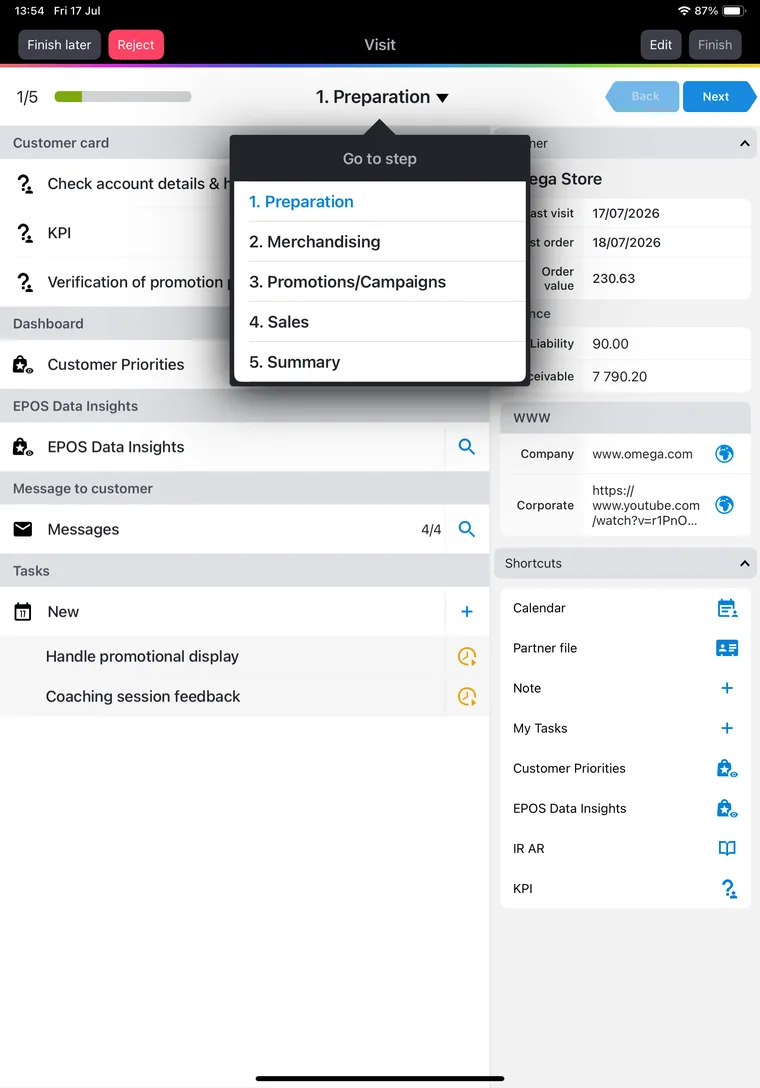
Perfect Store
Score the shelf while the rep is still in the store
Most brands have a perfect store defined — the right range, availability, visibility, price and promotion for each kind of store. The hard part is knowing whether each store actually matches it. Perfect Store measures every store against your standard automatically, on every visit, and turns a subjective “looks fine” into one objective, auditable score.
Most audits tell you what was wrong after the rep has gone. Perfect Store scores the store while the rep is still in it. It flags exactly what misses the standard, so the rep fixes the gap before they leave and the store improves on the visit itself.
- Built to your standard. Set what “perfect” means by channel, segment or region — the range, the shelf, the price, the promotion — and change it yourself, without an IT project.
- However you check the shelf. Reps can score the store by hand, or let image recognition read availability, facings and planogram compliance from a photo where it’s on. Either way it’s the same consistent score.
- A score you can act on. It feeds coaching, targets and incentives, and it’s objective enough to take into a conversation with the retailer.
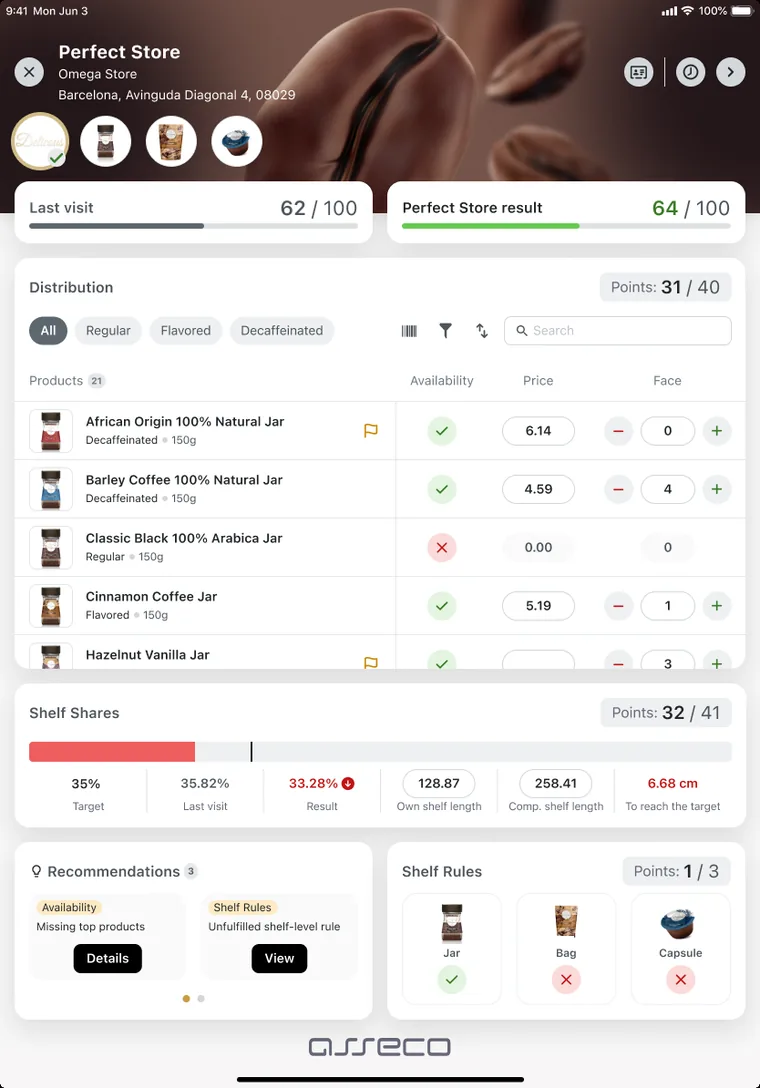
Retail Image Recognition
The shelf reads itself from a photo
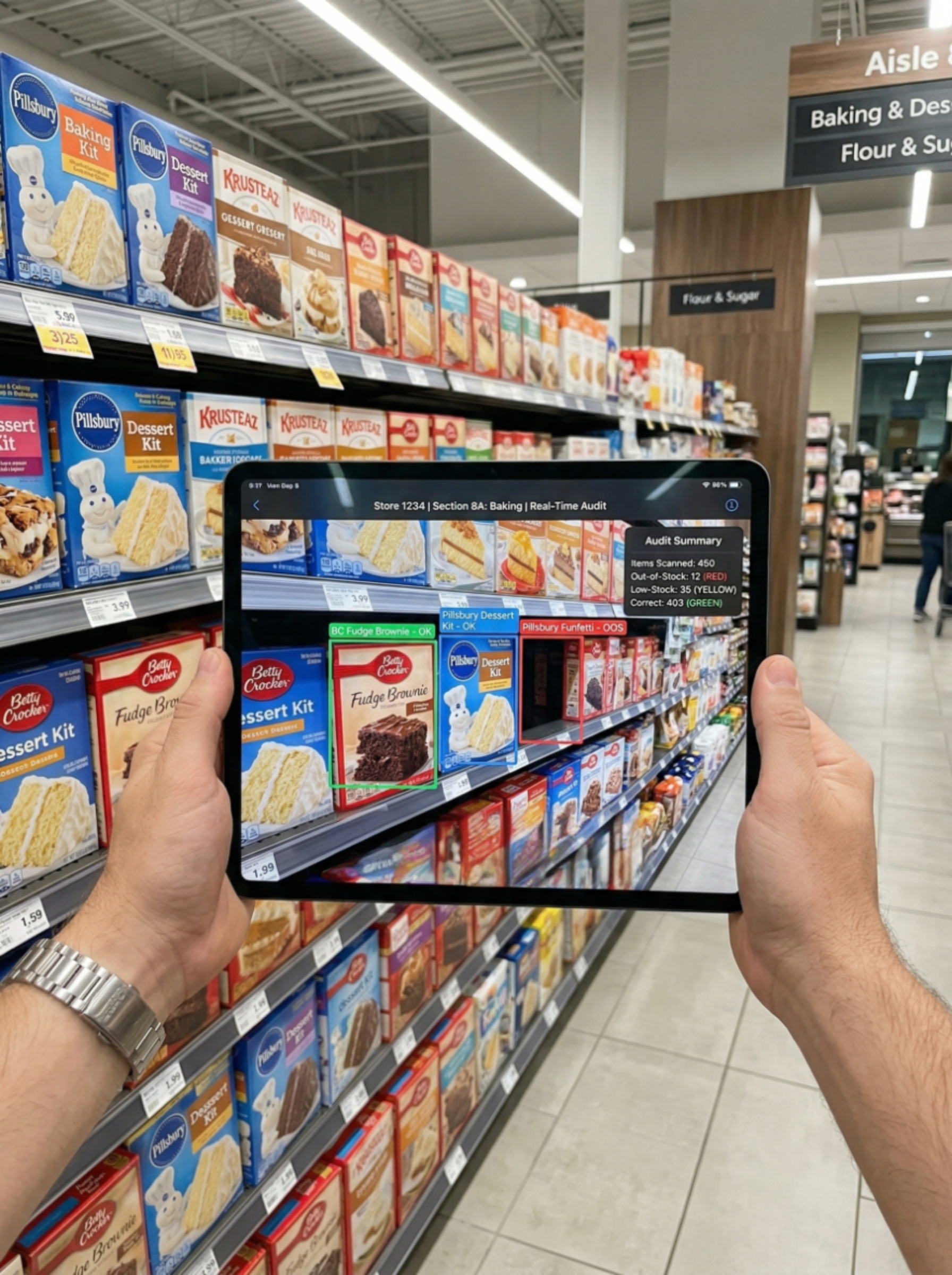
A rep photographs the shelf and image recognition reads it back — availability, facings, share of shelf, planogram compliance and pricing, as objective numbers in seconds, with up to 98% accuracy. The manual checklist goes away, and with it the gap between what gets reported and what’s really on the shelf.
The read turns straight into action, in the same visit. The moment the photo is analysed, the rep gets the next move on their device: order what’s missing, fix a price that’s off, rebuild a display that’s below standard. The insight lands while the rep can still act on it.
- One truth everyone trusts. Head office, the field, merchandising agencies and retailers see the same photo and the same result.
- Feeds the rest of the visit. The read drives the Perfect Store score, counts toward targets and flows into your analytics.
- Audit far more, far more often. Because a check is just a photo, you can cover many more stores without adding rep hours.
- A product in its own right. Retail Image Recognition is a full solution on its own — see Retail Image Recognition.
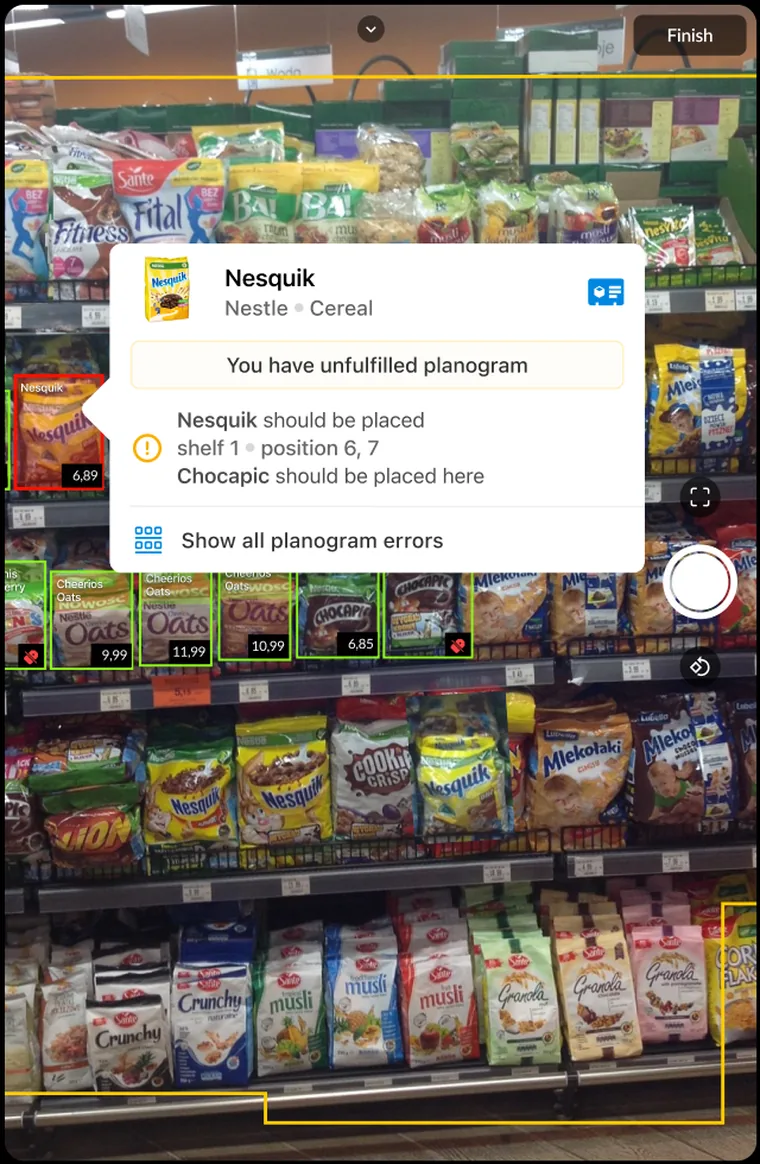
In-store checks
Put any question to the field, on demand
In-store checks are how you get an answer to whatever the business needs to know in store, on demand — did the launch land, is the new display up, how’s service and availability at the fixture, what’s a competitor running. Unlike your standing Perfect Store scorecard, a check is built for the moment: you put the question to the field, have it live in days, and retire it once it’s answered.
A check goes from a question to the field in days, not a project cycle. The answer comes back with the next action already set, so the rep acts on what’s found before leaving the store — and what you asked this week is answered and acted on this week.
- Beyond the shelf scorecard. Service, cleanliness, layout, a launch, a competitor’s move — the reality that shapes sell-through but sits outside your standing KPIs.
- Answer new questions fast. When a priority shifts, a new check is in the field in days — no project, no waiting on IT — so the field keeps pace with the business.
- One reliable read, everywhere. Every store answered the same way, online or off, so managers and head office work from the same picture.
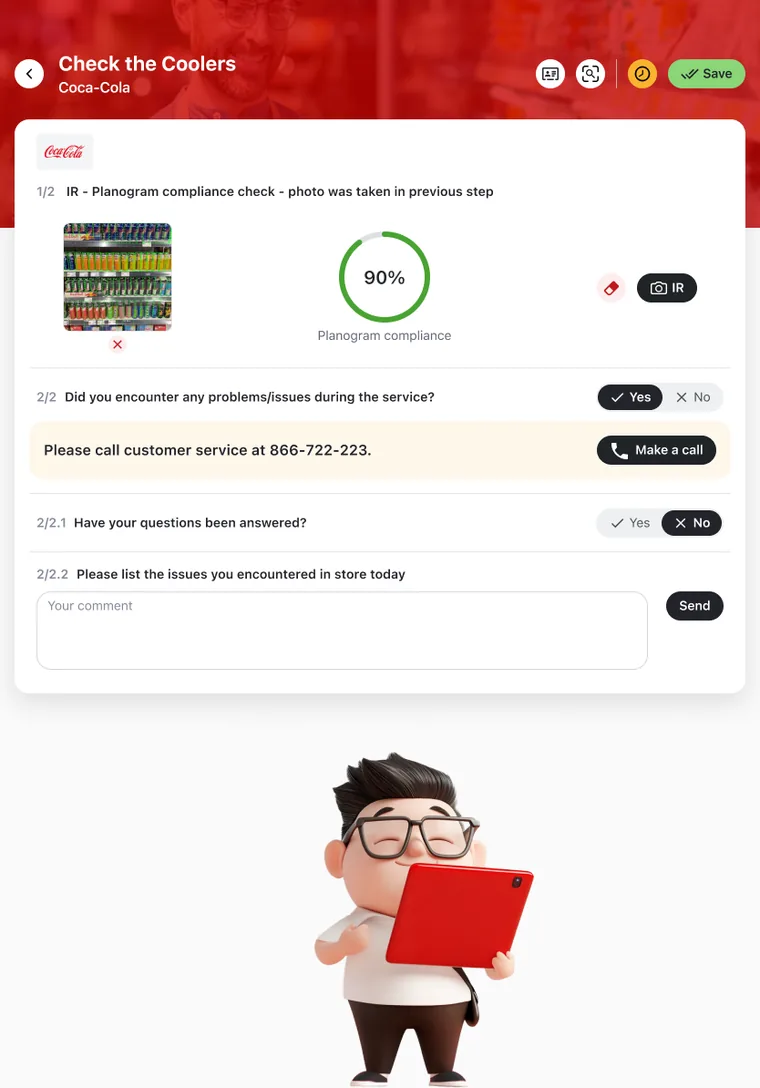
Store profiling
Capture the facts about a store that sales data misses
Store profiling gathers the softer facts about each outlet, the ones that never show up in sales data. Switch it on when there’s something you want to know, and reps collect it on the visit — does the store have a meat counter, a beer garden, a deal with a competitor. If it describes the point of sale, you can ask it.
What the rep learns updates the customer record itself. It reads in what’s already known, writes back what’s changed, and fills the fields that were blank, then refreshes the visit on the spot, so the new picture is in play straight away.
- Questions that follow the answer. One reply opens or hides the next, so a rep only answers what’s relevant to that store.
- On when you need it. Switch a round of profiling on for a season or a single question, gather what you need, then switch it off, so the visit never fills with questions that no longer matter.
- The bigger picture. For dividing the whole market into tiers and shaping route-to-market strategy, see Store segmentation.
POS & display management
Show the store the display before it ships
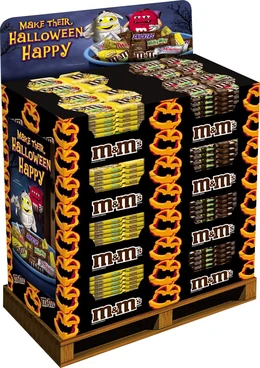
Point-of-sale material comes in two kinds, and both cost money. Temporary displays, usually cardboard, go in for a promotion and are thrown away when it ends. Permanent fixtures like metal stands, coolers, racks and screens stay for the long term and are worth real money. POS & display management handles both: getting the material placed, and keeping account of the assets worth tracking.
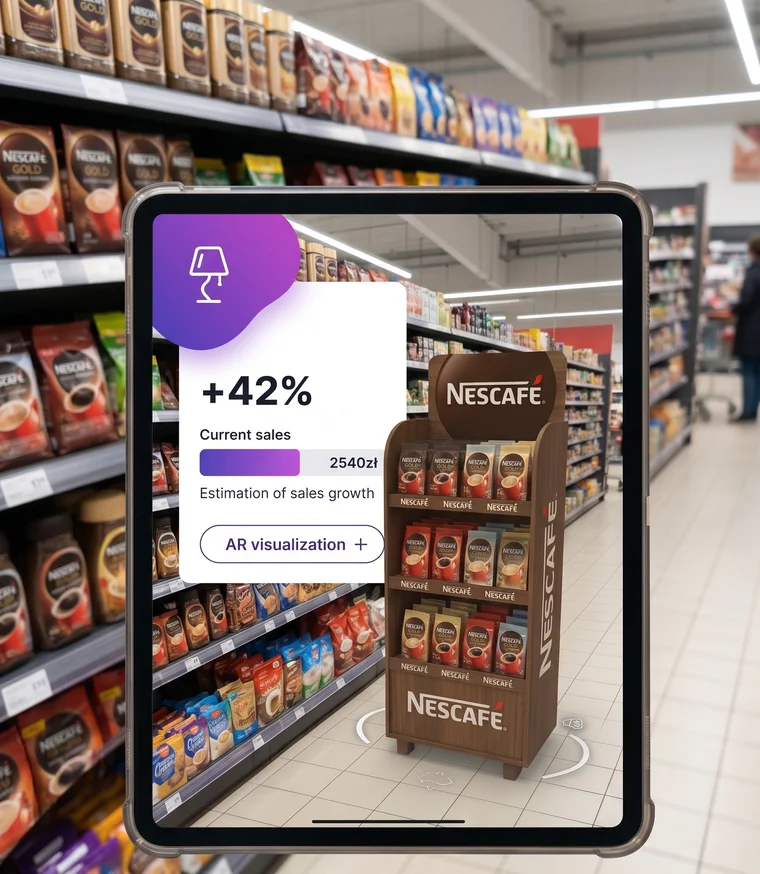
The rep wins the placement in the room. Before anything ships, they show the store manager how the display will actually look standing in their store: a 3D model dropped into the space through augmented reality. The manager sees it in their own aisle before giving up the space for it.
- Two kinds of POS, one system. Temporary promotional displays that go in for a campaign and retire when it ends, and permanent fixtures like stands, coolers, racks and screens that are built to stay.
- Every permanent asset on the books. Each fixture carries its own QR or barcode and a unique ID, so you register and track it like a fixed asset. When its time in one store is up, you move it to the next customer instead of writing it off.
- A business case that wins the space. To help the rep convince the store, a Selling Story projects what the display would add in this outlet, and where it pays off most, at the checkout or on the shelf. Where you have sell-out data, it runs on real numbers.
Consumer promotions
Take every consumer promotion from plan to proof
A consumer promotion is aimed at the shopper, usually a better price on the shelf, backed by activity in the store. It can come three ways: set centrally by a key account manager for a whole chain, framed centrally but activated store by store at the rep’s discretion, or designed by the rep within a local budget. However it starts, the platform runs it through every stage in store.
Each promotion runs as a sequence, not a single event: plan it, get the stock in, check the activation is live and correct, then measure the effect it had. Every stage carries its own checklist and forms, so a skipped tasting or a display that never went up shows up while the promo window is still open, not in the post-campaign report.
- Set centrally, regionally or locally. A chain-wide promotion the rep only verifies, a central offer the rep activates store by store, or one the rep designs within a local budget.
- Backed by real activity. Tastings, POS material, promotional media and in-store staff, planned and checked alongside the price.
- Checked at every stage. Stock-in, activation and effect each carry their own survey, so what you set out to measure gets measured on the visit.
Order capture
Every order comes out right for the store
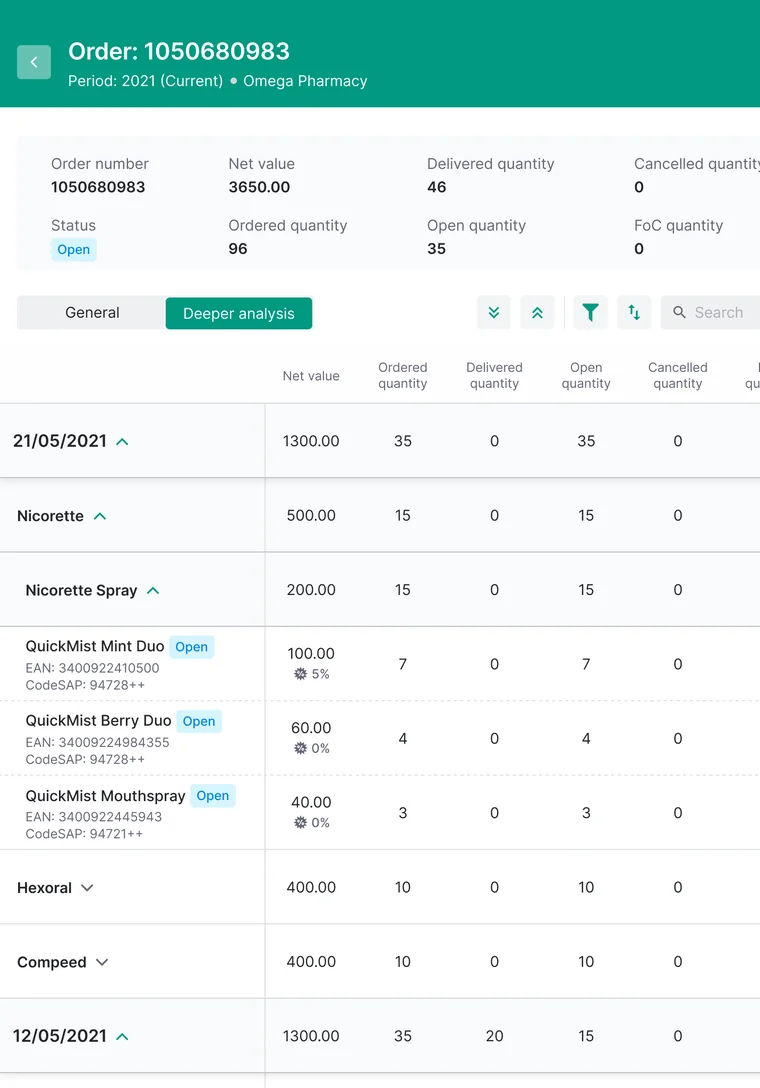
Every order a rep takes is already right for that store — the assortment that belongs there (its listing, must-haves and priority SKUs), the price that applies to that customer (their own discount terms, calculated automatically), and what’s genuinely in stock, yours or your partner’s.
The order also grows as the rep builds it. The system surfaces the next SKU worth adding — a gap in the range, a line this store usually reorders, or the SKU that’s a current priority — so the push you set at head office becomes the next suggested line, right at the moment of sale.
- However you go to market. Fulfil on the spot, or route the order to the wholesaler or distributor who fulfils it.
- Even where a chain keys its own orders. Generate a clean, barcoded PDF the rep hands to the store to enter in seconds.
- Carries your promotions. One order can apply several promotions at once, each on that client’s own terms.
Sales promotions
Reward the store for buying more
Sales promotions are deals aimed at the store itself: buy more, get more. You set what earns the reward — hitting a value, taking a quantity, or ordering a ready-made bundle at promotional terms — and what the store gets back: a better price, a discount, free goods or marketing support. The rep runs the right one at the order, inside the budget you set.
The promotion is part of the order, not a separate negotiation. As the rep builds the order the deal applies on top of that store’s own terms, so one order can carry several promotions at once and each still respects its budget and limits.
- Three ways to reward the buy. By the value spent, by the quantity taken, or as a ready-made bundle at promotional terms.
- The reward fits the account. A better price, a discount, free goods or marketing support, set to what moves this store.
- Aimed at your targets. When a product sits in your target, the promotion that helps hit it is the one proposed, so the rep’s deal also serves the head-office plan.
Selling StoriesPOI Best-in-Class
Sell in with this store’s own numbers
Wherever a rep needs to win a point with the store, a Selling Story backs them with an interactive case built on that store’s own numbers. Whether the pitch is a launch, a display, a promotion or a loyalty program, the rep shows what it would mean here: a calculator projects the extra turnover, weighing what this store and its neighbours already sell, right down to sell-out. The buyer sees a number they recognise as their own.
The right story is ready for the moment: the launch case at a launch, a placement simulation when proposing a display. Each one runs on comparable-store and sell-out data, so the case holds up when the buyer pushes back.
- Interactive, on screen. Presentations, promotional video and calculators the buyer follows as the rep talks.
- Built on real data. Projections draw on comparable-store performance and sell-out, so the numbers are the store’s own.
- Know which stories work. See how long buyers spend on each material, so trade marketing doubles down on what gets used.
Outlet AgreementsPharma & HoReCa
Turn an outlet into a committed partner
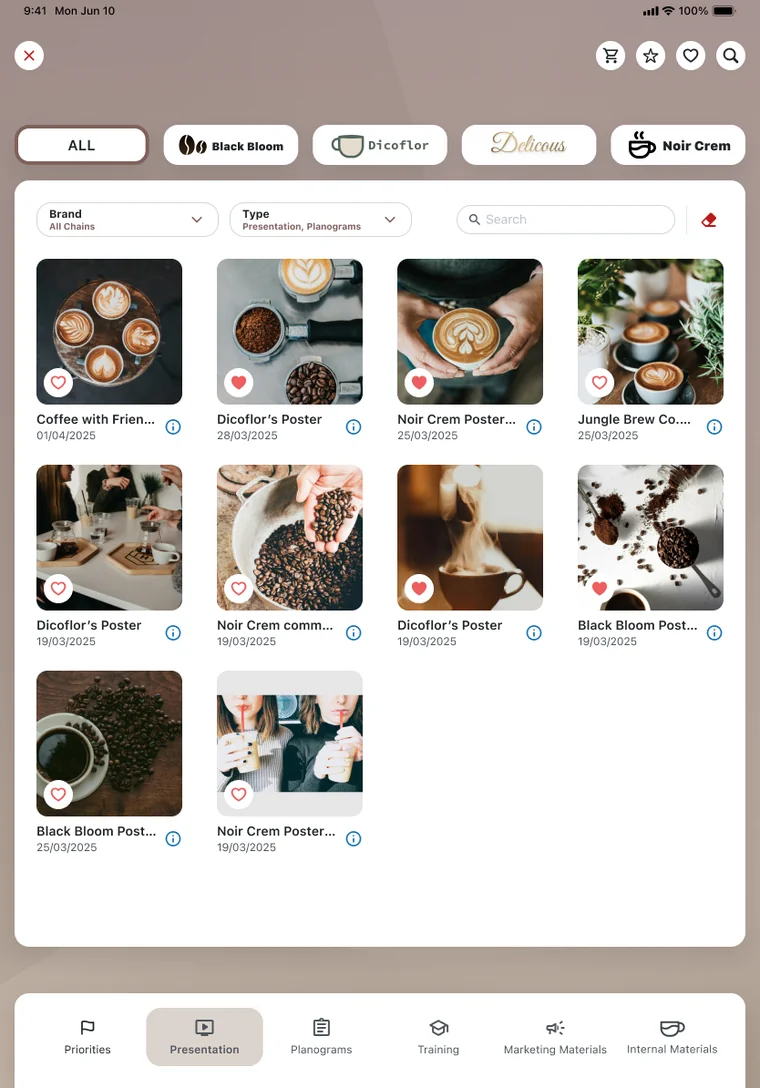
In pharmacies, bars and restaurants, growth comes from a standing deal with the outlet. The rep sits down with the outlet and negotiates a commitment: over the year — broken into quarters — the outlet commits to specific products, brands or categories by value or volume, and you commit to support in return. The whole agreement is built, signed digitally and tracked in the field.
The commitment can run on how the outlet sells as well as how much: products kept visible, listed on the menu, promoted by staff. And what you give back flexes to the partner: a marketing payment, an investment in the venue, or a loyalty scheme that earns staff points for hitting targets.
- Managed quarter by quarter. Progress is tracked as the year runs, so when an outlet falls behind you act mid-contract, before year-end.
- Measured on real data. Delivery is tracked on sell-out, field data and image recognition, so settlement reflects what the outlet actually achieved.
- Renews itself. As the contract ends, the next one is proposed automatically, with terms shaped by what this outlet delivered.
OneView
See what’s really happening in your stores, while you can still change it
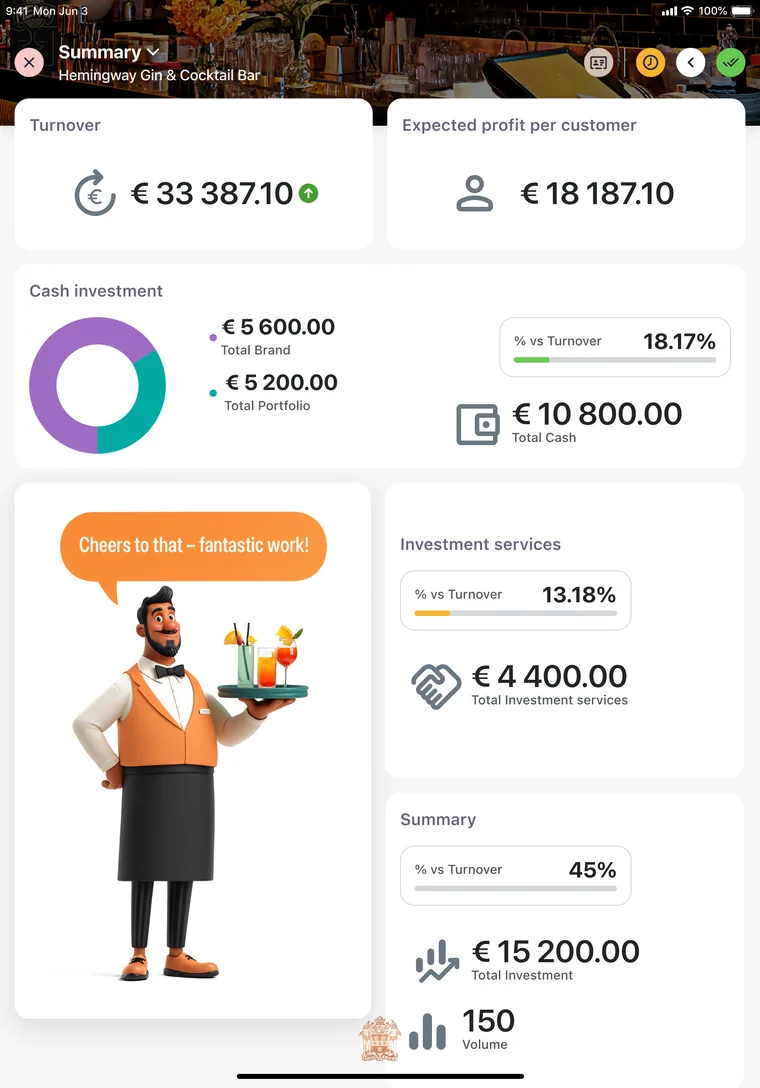
OneView is the platform’s analytics layer — it turns every visit your field teams run into reporting head office can act on. You see execution quality and the sales behind it: orders and value, performance against target, and the KPIs that matter (Perfect Store, on-shelf availability, strike rate, coverage), store by store and rep by rep. A manager can tell a visit that drove real selling from a routine call-in and step in while the period is still open — coach, redirect, or address a slipping account.
It shows whether that execution is actually paying off. Because the analysis sits in the same platform as the execution, it connects what happens on the shelf to what sells through: you can see whether stronger Perfect Store scores and better availability turn into more sell-out, and back the standards that genuinely move sales.
- Per store and per rep. Drill from a region down to a single outlet or rep, so both sides open the conversation from the same evidence.
- The KPIs the category runs on. Perfect Store, on-shelf availability, strike rate, coverage — tracked consistently across markets.
- Closes the loop. What the analysis surfaces flows straight into the next coaching session and the next target check.
CoachingPOI Best-in-Class
Reach the rep before the numbers slip
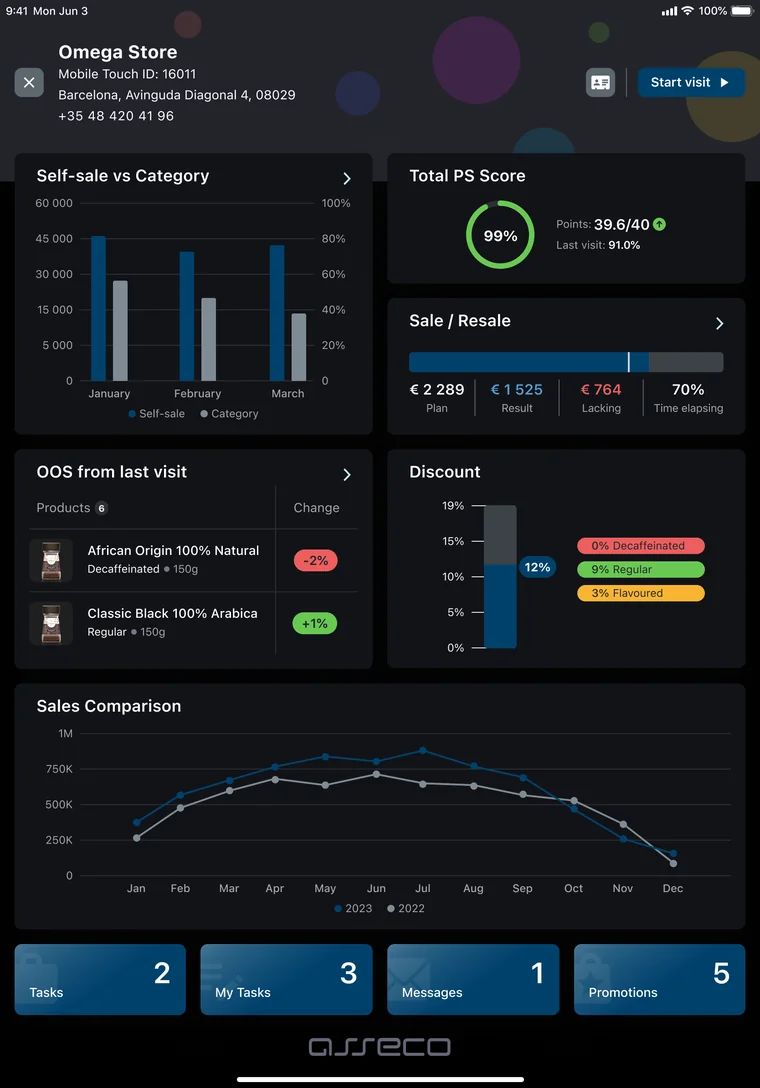
Most coaching goes to the reps a manager already knows, or kicks in a month after results slip. Here it runs the other way: the system reads each rep’s own data — visits, audit quality, target progress, Perfect Store scores, order history — and surfaces who needs coaching and on what, with concrete observations to act on. So a quiet mid-performer who’s been drifting gets caught early, before the numbers make it obvious.
It’s a program you can prove, top to bottom. Leaders see how many sessions actually happen, which skills are weak in which region, and how a rep’s results move in the 60–90 days after a session, and whether the managers themselves are genuinely coaching.
- Walk into the 1:1 ready. The data’s aggregated and the session pre-planned; manager and rep see the same picture, and the next session schedules itself.
- Runs on the work already captured. Visits, Perfect Store scores, targets and orders feed it.
- Recognized for it. Asseco Platform was named Best-in-Class for Coaching in the POI 2026 Enterprise Planning & Retail Execution Vendor Panorama.
Incentives
Reward exactly what drives your business
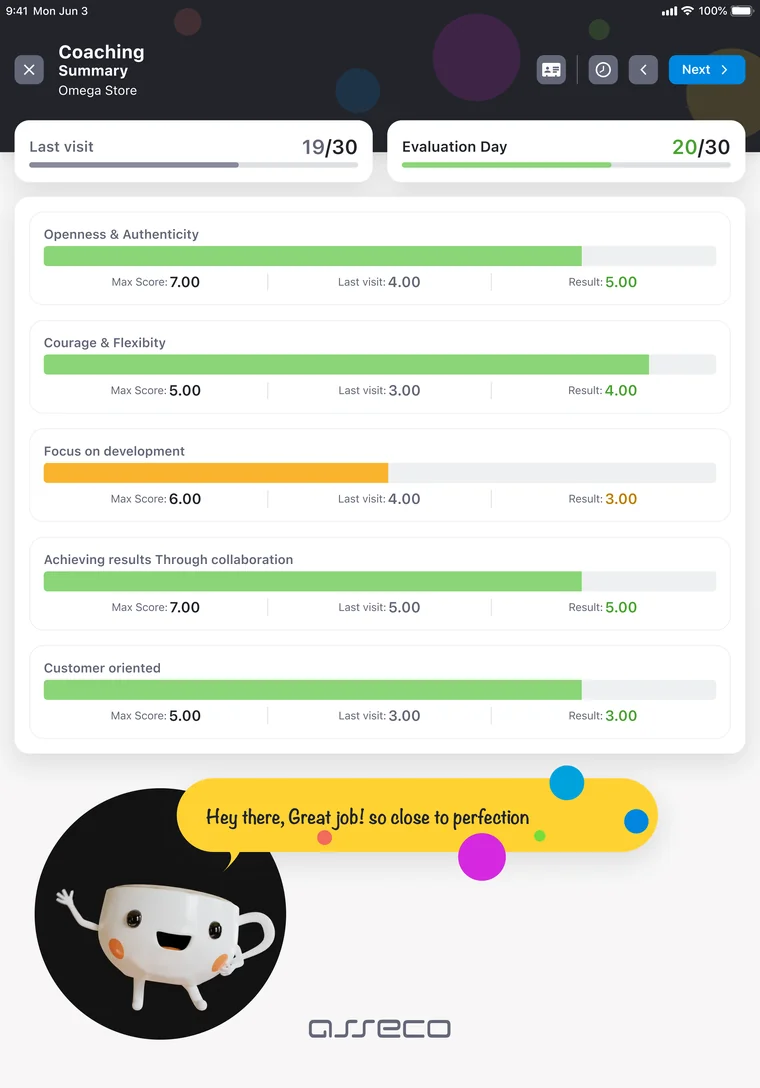
Incentives reward your field reps for the outcomes your strategy depends on, so what head office wants to grow becomes what each rep works toward. Build the plan from the pieces that fit your strategy — straight bonuses, payouts tied to target attainment, threshold steps, and rewards for execution quality against your Perfect Store standards — for a single rep, a territory or a whole region. However many pieces you combine, they roll up into one clear payout.
It’s motivation reps can actually see. Built on targets that update as they work, each rep watches their bonus take shape in real time — what they’ve earned, how close the next step is — so the payout stops being a month-end surprise and becomes something they work toward all month.
- Runs on your targets and standards. It reads straight from the goals and Perfect Store KPIs you’ve already set.
- Bursts inside the season. Individual components can run shorter than the whole plan — a launch month, a weekend push — without rebuilding it.
- Quality and volume together. Reward the sale and the way it was executed.
Motivation
Turn results into a race reps want to win
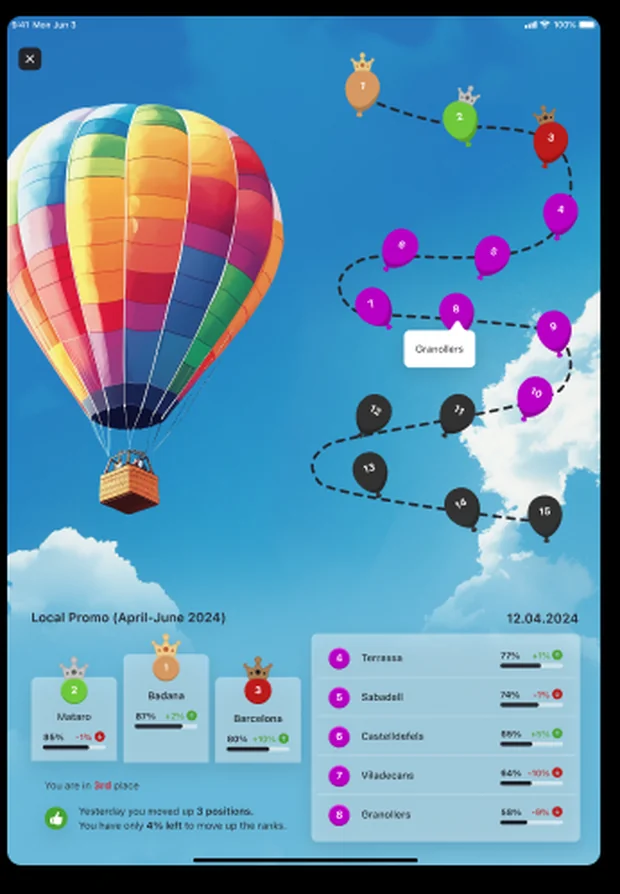
Motivation turns a rep’s results into a live standing they can see and want to climb. Run a leaderboard across the whole force or just a region, or set a contest on the goals that matter this period, and every rep sees where they rank, how they moved, and how far to the next place. Recognition and a bit of competition keep the whole team pushing.
It runs live, all period long. A rep watches their position move as they work, and the system projects where they’ll finish if they hold the current pace, so the standing is something to act on now, while the period is still open.
- Leaderboards you shape. Rank the whole force or a single region, and choose how much of each other’s detail reps can see.
- Contests on this period’s goals. Set a competition with its own leaderboard and window, on the targets that matter now.
- Runs on results already captured. It sits on the rep’s card beside their targets, built from the work the platform already tracks.
Customer stories
Proven in the field
How FMCG leaders run Sales & Retail Execution across their markets.
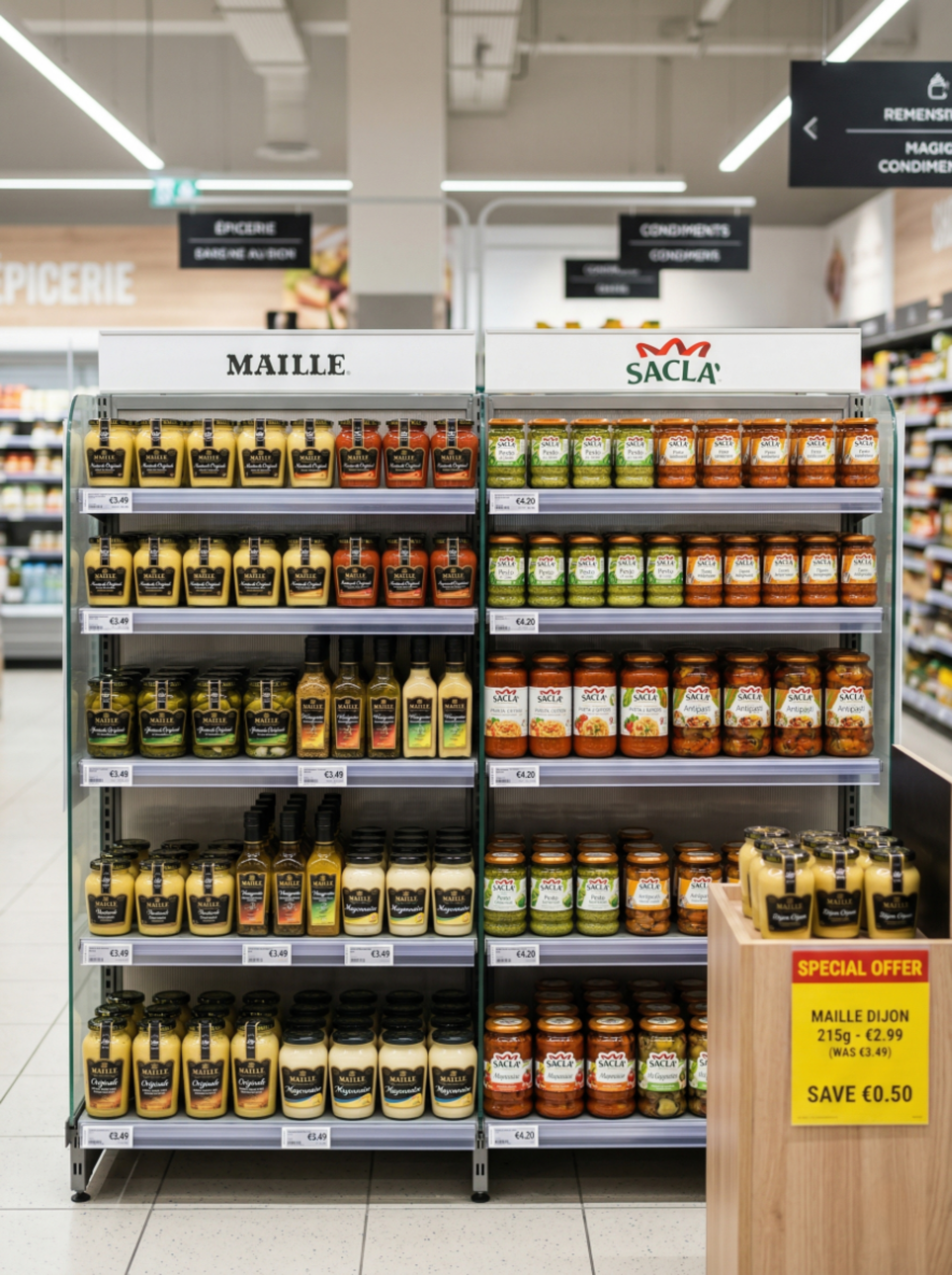
How a leading European food group unified Perfect Store execution across 6 markets
“We needed one platform that two separate sales organizations could share — same stores, same audits, but completely independent reporting. The system gave us cross-market Perfect Store benchmarking at HQ level while keeping local promotion workflows intact.”
— Commercial Excellence Director, European food manufacturer6
Markets
on one SRE platform
2
Brands
sharing one field force
100%
Perfect Store
visibility across all markets
↑
Sales uplift
from out-of-stock detection & Perfect Store
A global food manufacturer rolled out SRE to 20+ countries in 3 phases
“We replaced our legacy SFA across 20+ markets in three structured phases. The new platform increased our field teams’ capabilities while letting us maintain process continuity — reps barely noticed the switch. Now we are expanding into AI-powered shelf recognition on top of the same foundation.”
— VP Sales Operations, Global food manufacturer20+
Countries
migrated to one SRE platform
3
Phases
structured rollout (2018–2022)
0
Disruption
seamless transition for field reps
+IR
Platform evolution
now expanding into Image Recognition




Market analysts and standards recognize Asseco Platform
Independent endorsements that strengthen your internal business case.

Gartner Representative Vendor
Asseco Platform is listed as a Representative Vendor in the Gartner Market Guide for Retail Execution Management in FMCG.

POI Best-in-Class Category Distinctions
Asseco Platform received 9 POI Best-in-Class distinctions in 2026, including Retail Activity Optimization, Coaching & Training and Playbooks & Customer Presentations (Selling Stories).

ISO/IEC 27001:2022
An internationally recognized information-security management standard. Critical for enterprise IT decision-makers.
Gartner does not endorse any vendor, product or service depicted in its research publications, and does not advise technology users to select only those vendors with the highest ratings or other designation. Gartner research publications consist of the opinions of Gartner’s research organization and should not be construed as statements of fact. Gartner disclaims all warranties, expressed or implied, with respect to this research, including any warranties of merchantability or fitness for a particular purpose. Gartner, Market Guide for Retail Execution Management in Fast-Moving Consumer Goods, April 2025, G00768127. GARTNER is a registered trademark and service mark of Gartner, Inc. and/or its affiliates in the U.S. and internationally, and is used herein with permission. All rights reserved.
Competitive landscape
How Sales & Retail Execution compares
A transparent look at the FMCG retail execution and SFA market — from enterprise platforms to mid-market specialists.
Scroll the table sideways to see every vendor →
| Capability | Asseco PlatformBuilt for FMCG | Salesforce CG | Aforza | StayinFront | SAP Sales Cloud | Repsly | Pitcher |
|---|---|---|---|---|---|---|---|
| Market fit & credentials | |||||||
| Market segment | Mid-market → Enterprise | Enterprise | Mid-market → Enterprise | Mid-market → Enterprise | Enterprise | SMB / Mid-market | Enterprise (sales) |
| FMCG-native platform | Yes — built for FMCG | CG data model | CPG-native (Salesforce) | CPG + Life Sciences | Enterprise + CPG | CPG (SMB) | Multi-industry + CPG |
| FMCG track record | 30+ yrs FMCG, 74 countries | Since 2019 (Agentforce CG) | Founded 2019, 40+ countries | Since 2000, 50+ countries | Decades, 180+ countries | Since 2008, 80+ countries | Since 2011, 140+ countries |
| AI, imaging & optimization | |||||||
| Image Recognition — ownership | Native — own engine (offline) | Native — Einstein Vision | 3rd-party marketplace | Native — on-device | Native + partner (Wisy) | 3rd-party (ParallelDots) | Via partner (EasyPicky, 2026) |
| Image Recognition — accuracy | up to 98% (validated at scale) | Not disclosed | Depends on partner | Not disclosed | Not disclosed | Partner-reported | — |
| Route optimization | Autonomous — nightly 30-day plan | AI-assisted (Maps + Einstein) | AI-assisted planning | AI-assisted (Dynamic Routing) | AI-assisted planning | Basic (native) | Basic |
| Activity optimization | RAO — POI BIC | AI NBA (Einstein) | Ava AI (agentic) | RAO | RAO | Prioritized scheduling | Next Best Action (PIA) |
| In-store execution & data | |||||||
| Perfect Store | Real-time KPI (manual + IR) | Audits, surveys, offline | Guided by Ava, offline | KPI scoring per store | Dedicated module | Checklists, compliance | Audits, aisle surveys |
| Coaching | Coaching (POI BIC) + incentives | Gamification + supervisor | Ava as coach | Coaching | Joule AI guidance | Performance dashboards | Coaching + roleplay |
| Offline + on-device AI | Full offline — SFA, IR, AR | Offline SFA app | Offline SFA | Offline SFA + on-device IR | Offline SFA app (GA 2026) | Offline SFA (sync) | Offline SFA |
| Trade data & integration | Trade Data Hub + Trade Terms | Native TPM + MuleSoft | TPM + DMS | POS data (RDI) — no TPM | TPM + RGM + DSD + S/4HANA | No native TPM | No trade data |
Based on publicly available vendor information as of July 2026 — vendor websites, press releases and analyst announcements. Asseco Platform figures reflect production deployments at scale.
One platform
One platform. Every moment in FMCG execution.
Sales & Retail Execution runs the field. It is part of one commercial suite where execution, data, planning and settlement share the same numbers.
Trade
Data Hub
See where your products really sell.
- See which stores actually stock your products, and which keep reordering them
- Right down to outlets you reach only indirectly, through distributors and wholesalers
- Across every route to market: distributors, chains, foodservice and online
Route-to-Market
Optimization
Decide where to invest sales effort and where to grow.
- See where you can grow most across stores, bars and restaurants, then send your reps there
- Find the stores and territories you’re not reaching yet
- Plan promotions where they’ll pay off, before you launch
Sales & Retail
Execution
The field execution layer. The full workflow is detailed above on this page: visit planning, RAO, Perfect Store, order capture, promotions, coaching.
Retail
Image Recognition
Automated shelf audit from a photo.
- See what’s on shelf: facings, share of shelf, out-of-stock
- Check planogram and price compliance instantly
- Verify promotions and displays went up as agreed
- Get fix-it actions while the rep is still in the store
Trade Terms
& Settlement
Agree commercial terms, then settle them on real numbers.
- Put all your trade terms in one place: targets, rebates, promo deals
- Track whether partners deliver, on time and in full (OTIF)
- Settle promotions and rebates automatically from real sales data
FAQ
The questions we get most often about Sales & Retail Execution
Gathered from conversations with sales directors, trade-marketing managers and IT teams at FMCG manufacturers. If your question isn’t here — get in touch.
What it is & how it differs
What is Sales & Retail Execution?
Sales & Retail Execution is the retail execution platform for FMCG field teams, used on the Mobile Touch app. It runs the whole visit cycle — plan the call, sell in store, execute at the shelf and review the results — covering visit planning, orders, surveys, merchandising, promotions and targets, with capabilities like Perfect Store, Retail Activity Optimization, Route optimization and Coaching. Field teams across 74 countries run on it.
What is Mobile Touch?
Mobile Touch is the Asseco Platform field execution app — the day-to-day workspace for FMCG reps and merchandisers. It runs sales force automation, retail execution, image recognition and route optimisation on one device (iOS, Android, Windows), and is the app behind Sales & Retail Execution, used by field teams across 74 countries.
How is Mobile Touch different from a generic SFA app?
A generic SFA tool captures orders and logs visits. Mobile Touch adds AI image recognition (planogram compliance, shelf share), Route optimization, Perfect Store scoring, Retail Activity Optimization and full offline operation — so every visit is measured, not just recorded. Reps work in one app; managers see one source of truth.
Scope & rollout
What’s included as standard, and what can you add?
Every deployment starts with the core of the platform — visit planning, in-store execution, orders and promotions, and reporting. Advanced capabilities are added when you’re ready: Perfect Store, Retail Activity Optimization, Route optimization, Coaching and incentives, and Retail Image Recognition. You start with the essentials and layer on the rest.
Does it work offline?
Yes. The Mobile Touch app (iOS, Android and Windows) is built for full offline operation — essential for stores with poor or no connectivity. Orders, surveys, audits, image recognition and route data all work offline and sync automatically when the connection returns.
Integration & proof
How does it integrate with our ERP and existing systems?
Sales & Retail Execution integrates with your ERP and CRM via standard APIs, so it runs on your master data and feeds results back — orders flow straight through. The Trade Data Hub handles data exchange with distributors and retail chains.
Which FMCG brands use Sales & Retail Execution today?
Field forces at many of the world’s largest FMCG companies run on the platform — including Kraft Heinz, Nestlé, Coca-Cola HBC, Henkel, SC Johnson, Imperial Tobacco, Pernod Ricard and Ferrero — on a platform with 125,000+ users across 74 countries.
See it in your stores
Tell us how your field teams work today — your markets, channels and team — and we’ll show you what the visit cycle looks like on Sales & Retail Execution.
Book a live demo