



Find out which stores your field reps will grow sales in.
Segmentation shows how much a store sells today and whether its potential is rising. Send your reps where their work will bring the biggest growth — without expanding the team.
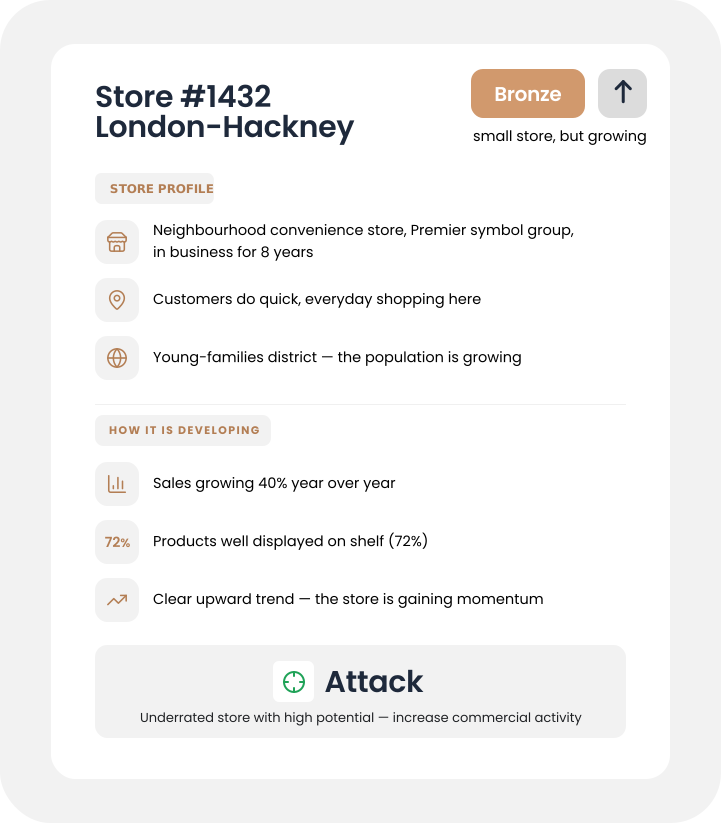
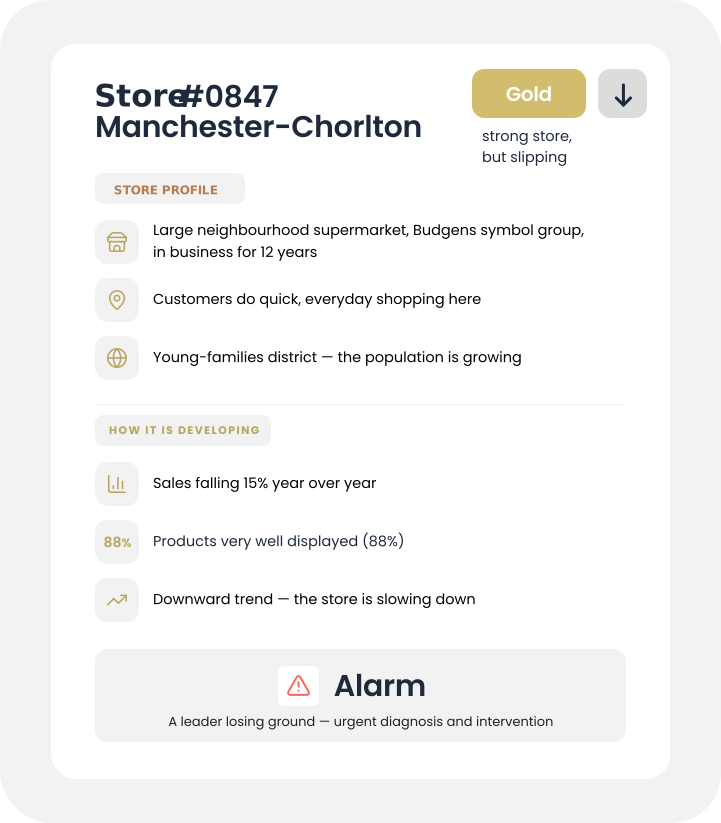
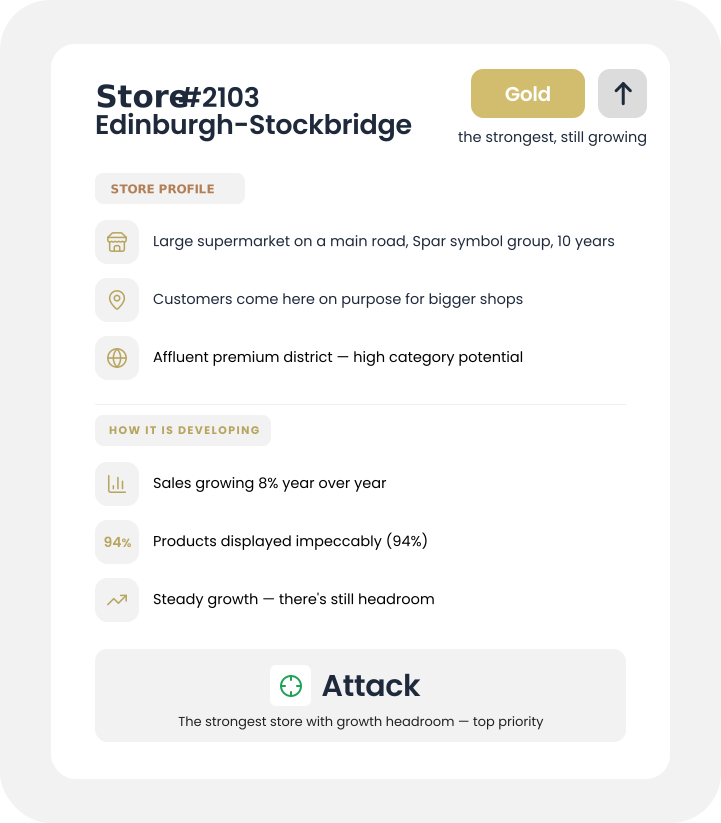
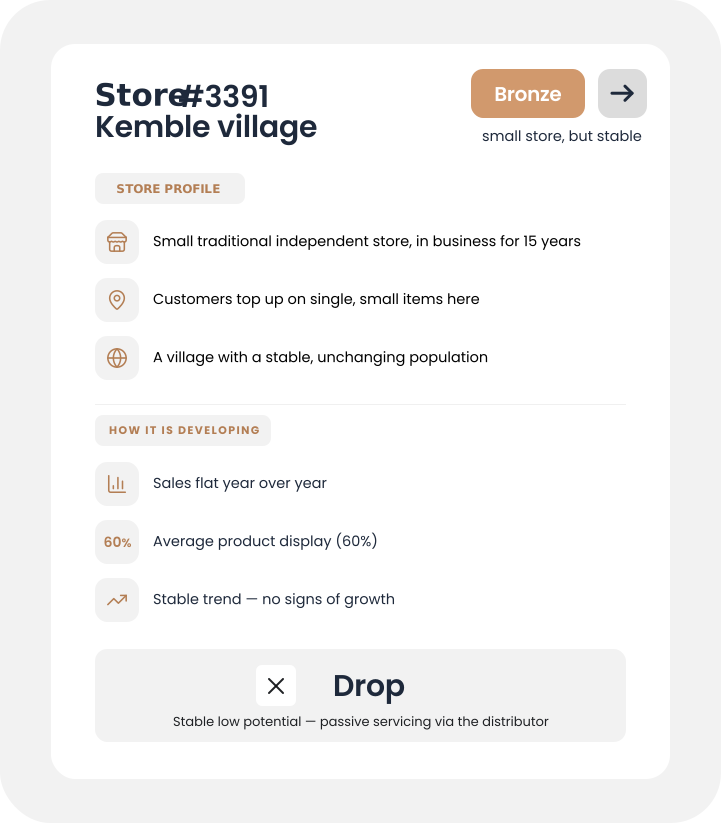
*Bacardi case on one of the European markets
the same team, zero new hires
better results without higher costs
Are you sure your field reps are visiting the right stores?
You have X thousand stores in your database and Y reps who physically cannot reach everywhere. Who visits whom decides your sales — and it usually comes from a revenue-based ranking, not from a store’s real potential.
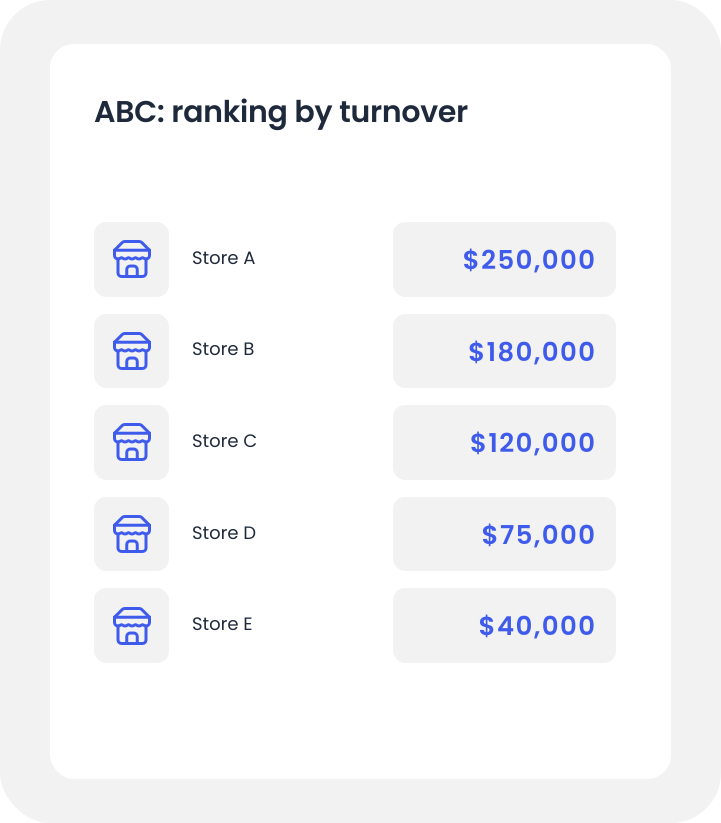
What classic ABC analysis sees
- Sees only revenue — the ranking shows the state today, not the direction for tomorrow
- Ignores everything beyond sales — store format, location, shopper mission, surroundings
- Who visits whom is decided by the ranking and the team’s intuition — with no data on trajectory
- Doesn’t see stores outside the current visit plan — not even those with the highest potential
- Counts all stores together — ad-hoc outlets and centralized chains distort the ranking
What Asseco Segmentation sees
- Assesses every store on two dimensions: how much it sells today and whether it’s growing
- Builds a full picture of the store from many sources — not just sales
- One concrete decision per store — attack, defend or drop — from data, not gut feeling
- Also surfaces stores outside the visit plan as candidates to serve
- First cleans the database — filters out out-of-scope outlets and treats centralized chains as background
Asseco Segmentation answers the question ABC never asks: not „where is this store today”, but „where is it heading”.
Asseco Segmentation step by step. With each dimension the picture of the store comes into sharper focus.
Classic ABC analysis describes a store through one dimension — revenue. That’s a static picture that works in a stable market. In FMCG, a stable market doesn’t exist. Asseco Segmentation builds the picture of a store layer by layer — up to the decision matrix as the final synthesis of all layers.
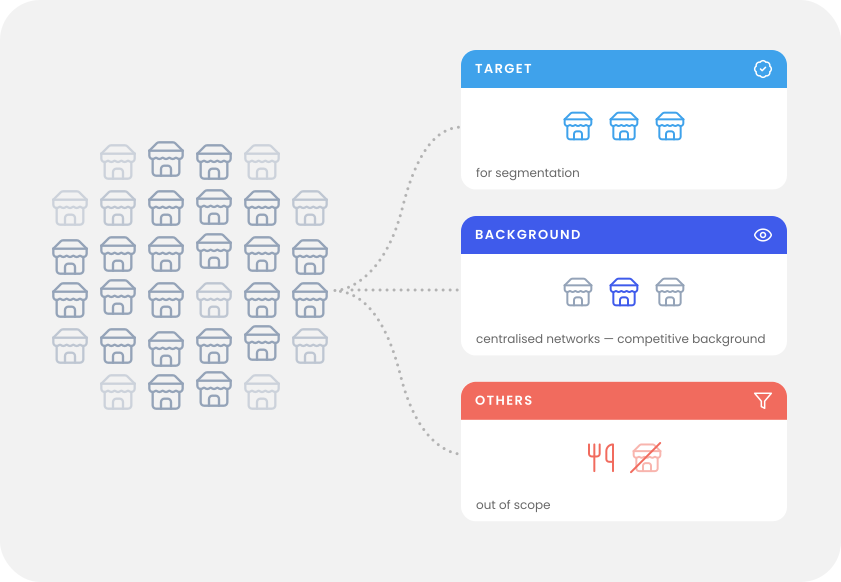
Firmographics — pre-segmentation
What it adds: the legal identity of the store and its activity status in public registers — retail chain (e.g. Premier, Budgens), industry, time in business, VAT-register activity
What we achieve: a 3-group split of the database:
- ●target — stores for active segmentation
- ●background — stores outside your direct coverage (usually centralized chains), treated as competitive background
- ●Others — out-of-scope: suspended businesses, food-service outlets, entities outside retail
We set the target / background / Others criteria together with you — you know your sales model best.
Why it matters: The number of stores on the market is very large — no sales team can serve them all. Pre-segmentation in Step 1 lets you focus resources where you can genuinely influence the result — you don’t waste reps’ time on stores beyond your strategic reach.
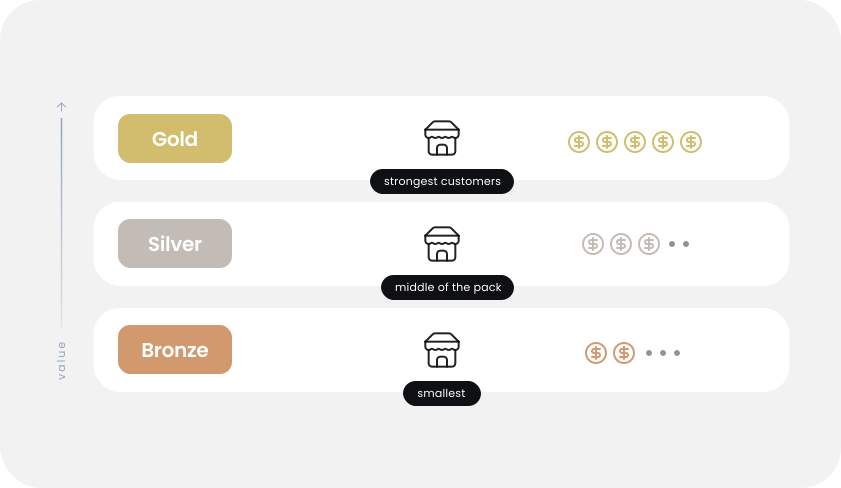
Sales
What it adds: hard numbers from invoices for the target stores from Step 1 — how much a store buys, how often, which product categories it takes, how many SKUs from your catalogue it actively orders
What we achieve: the first ranking of stores by real business value:
- Gold— strongest customers
- Silver— the middle of the pack
- Bronze— the smallest
Why it matters: This is the baseline you know from every sales report. But this is where ABC ends its analysis — it allocates reps in proportion to revenue. You know that’s not enough: a stable Gold today may be Silver next quarter, while an underrated Bronze is growing 40% year over year. The ranking alone doesn’t show where a store is heading — we add that in the next steps.
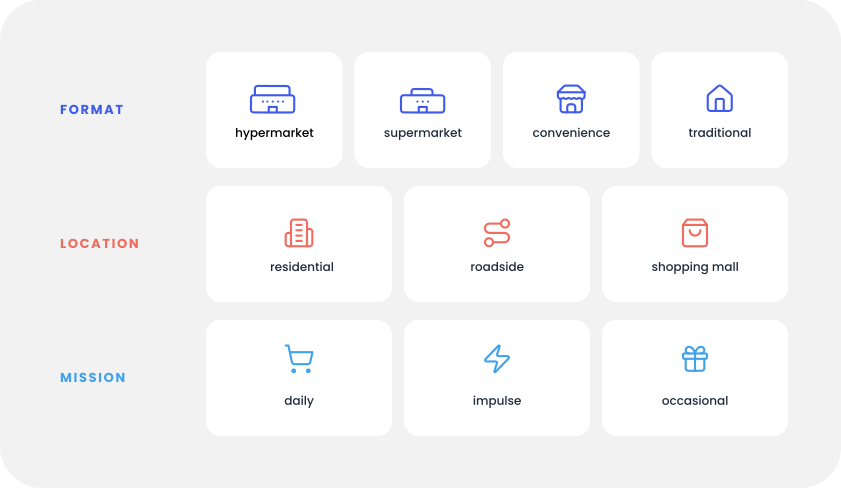
Three store axes
What it adds: the operational character of every store from Step 2 across 3 axes:
- ●Format — e.g. hypermarket, convenience, traditional store
- ●Location — e.g. residential, roadside, in a shopping mall
- ●Shopping mission — e.g. daily shopping, impulse, occasional
What we achieve: reference groups of comparable stores like-for-like — without them you can’t compare performance or compute a store’s trajectory over time
Why it matters: An 80 m² traditional store in a regional capital and an 80 m² traditional store in a village are two completely different businesses. The tier from Step 2 alone (e.g. both Silver) is not enough — we have to compare performance within the store’s real category.
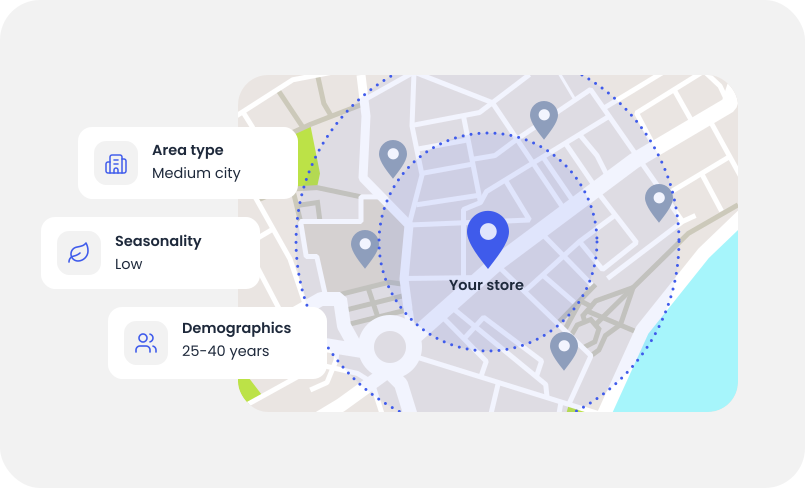
Geo-demographic surroundings
What it adds: the market context around the store:
- ●Area type — city, town, village
- ●Demographic profile of residents
- ●Trade area — the catchment the store draws customers from
- ●Competition in the area
- ●Seasonality — cyclical tourist traffic
What we achieve: a forecast of how changes in the surroundings affect the store:
- ●A new discounter opening nearby
- ●A shift in the area’s demographics
- ●Seasonal tourist traffic
Why it matters: A store doesn’t exist in a vacuum. An Aldi opening 800 metres from your Premier changes its forecast. Similar stores from Step 3 can have very different surroundings — which means their potential is assessed differently.
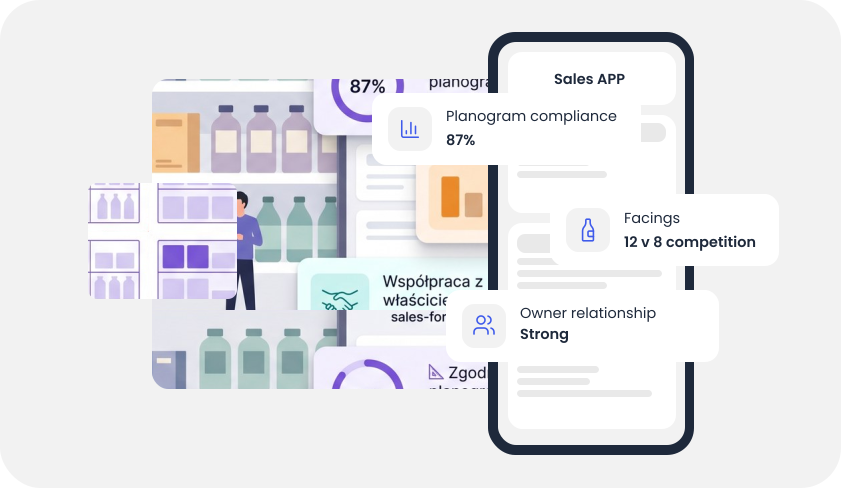
Visit data
What it adds: data collected during your reps’ visits:
- ●whether products are displayed as agreed (planogram)
- ●how much shelf space we hold vs the competition (facings)
- ●how the relationship with the store owner is going
What we achieve: a sharper assessment of the stores you already visit — ready-to-use, in-store guidance
Why it matters: Only stores your reps already visit have this layer — new stores are assessed without it. For visited stores, segmentation stops being a label and becomes concrete guidance: not just „this store is worth attention”, but „increase the display, negotiate a better shelf”.
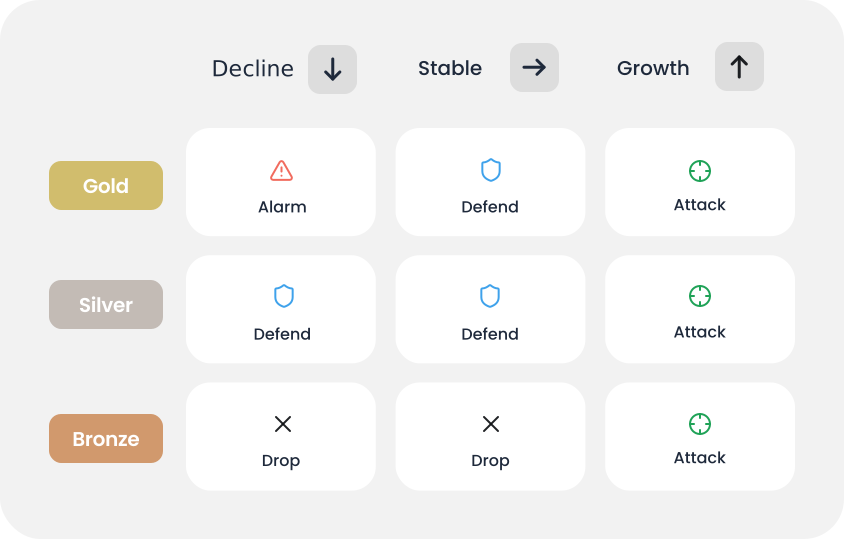
Potential vector + decision matrix
What it adds: the direction a store is heading — rising or falling versus its reference group (Step 3), factoring in the surroundings (Step 4) and operational data (Step 5)
What we achieve: a 3×3 decision matrix — it combines where a store is today (Gold/Silver/Bronze) with where it’s heading (↑/→/↓). Each of the 9 cells leads to a concrete decision
4 decision archetypes:
- ●ATTACK — intensify support
- ●DEFEND — hold the position
- ●DROP — passive servicing
- ●ALARM — urgent diagnosis when a leader starts to slip
Why it matters: Only now, once all layers are combined, does the matrix emerge — your team gets a concrete recommendation for every store.
All 6 layers together — the full Asseco Segmentation
ABC sees only sales. Asseco adds 4 more layers — firmographics, the three store axes, geo-demographic surroundings and visit data — then combines everything into a potential vector and a 3×3 decision matrix.
Comparing segmentation approaches
Asseco covers all 6 layers of the process. Classic methods — only fragments.
| Approach | Firmographics (pre-segmentation) |
Sales | Three store axes |
Surroundings | Visit data |
Vector + matrix |
|---|---|---|---|---|---|---|
| ABC analysis | ✕ | ✓ | ✕ | ✕ | ✕ | ✕ |
| Single-axis segmentation | ✕ | ✓ | partial | ✕ | ✕ | ✕ |
| Asseco Segmentation | ✓ | ✓ | ✓ | ✓ | ✓ | ✓ |
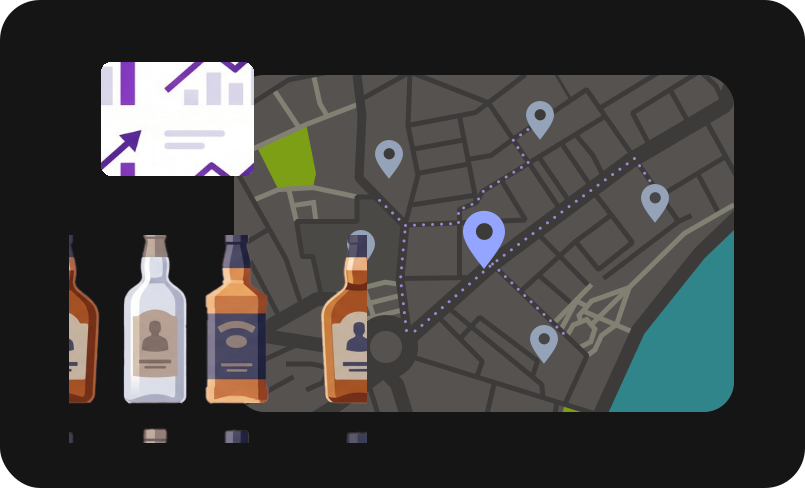
Bacardi: reallocating field-rep visits without expanding the team.
In one of its markets, Bacardi launched store segmentation that pointed out which stores to start visiting and which to stop. These weren’t intuitive choices or proposals based only on current revenue — segmentation also took into account the sales trajectory over time and the competitive surroundings. The result: the same sales force, better deployed.
+26%
Sales in discovered stores
Previously unvisited stores that segmentation flagged as worth attention. Previously invisible on Bacardi’s radar.
~+20%
Growth of total net sales
With the same number of reps and the same working time. Zero extra resources — purely better allocation.
Market analysts and standards recognize Asseco Platform.
Independent endorsements that strengthen your internal business case.



Gartner does not endorse any vendor, product or service depicted in its research publications, and does not advise technology users to select only those vendors with the highest ratings or other designation. Gartner research publications consist of the opinions of Gartner’s research organization and should not be construed as statements of fact. Gartner disclaims all warranties, expressed or implied, with respect to this research, including any warranties of merchantability or fitness for a particular purpose. Gartner, Market Guide for Retail Execution Management in Fast-Moving Consumer Goods, April 2025, G00768127. GARTNER is a registered trademark and service mark of Gartner, Inc. and/or its affiliates in the U.S. and internationally, and is used herein with permission. All rights reserved.
Segmentation is only the beginning. Asseco Platform grows together with you.
Start with what you have today
You don’t need ready integrations or perfect data. We work with what you already have — Excel files, exports, one-off files, system dumps — and turn it into a first segmentation. We design process automation only once you’ve seen the value.
Ready for more?
The next modules you can switch on when you want to go further:



The questions we get most often about store segmentation.
Gathered from conversations with sales directors, trade-marketing managers and IT teams at FMCG manufacturers. If your question isn’t here — get in touch.
Who it’s for and how it differs
Who did we build this module for?
For FMCG, alcohol, tobacco and beverage manufacturers working with distributors in the traditional trade. You’ll benefit most if you have a large network of traditional stores, your reps already run visits, and you want to rationalize their allocation without expanding the team. We also help build the case for distributors willing to share sales data.
How does this segmentation differ from classic ABC analysis?
ABC gives you a revenue ranking. That’s a static picture — it shows where a store is today. It won’t tell you that your Top 20 is starting to lose momentum, or that an unremarkable store in the second tier is growing 40% year over year. We add a second axis — the potential vector. Plus we describe a store not only by revenue, but across 6 layers (firmographics + sales + 3 store axes + geo-demographic surroundings + visit data + potential vector). That lets you tell apart a store worth fighting for from one where your category simply stops fitting the area.
How segmentation works
How do you identify a store’s shopping mission?
We don’t ask the store — we compute it from the sales basket based on product attributes (pack size, price segment, occasion type). During implementation we enrich it together with your trade-marketing team with the specifics of your category and brands.
Is the segmentation result explainable?
This is crucial for us. The result is not a black box — for every store we show which layers most influenced its score and how it compares to similar stores. Without that transparency, the sales team wouldn’t trust the recommendation when deciding visit routes.
What happens to stores that aren’t suitable to serve (Others)?
Not every store is suitable for regular commercial servicing. Food-service outlets buying products occasionally, small businesses registered as customers even though they aren’t retail points of sale — they show up in the sales data but are operationally out of scope. Segmentation marks them as Others, and your rep doesn’t waste time on them. We prepare the initial list automatically, and then you verify it with us — you know your market. If an Others store starts to grow over time, it comes back under observation.
Does the effect of segmentation diminish in later cycles?
The first cycle delivers the biggest gain — that’s when we uncover the largest gaps in the visit plan. In later cycles the scale of discovery naturally decreases (the strongest stores are found once), and the focus shifts to sustaining results and fine-tuning. The dynamics depend on the manufacturer, the category and the market.
Data and implementation
Do I need clean, ready-made data to start?
No. We work with what you have — Excel files, exports, system dumps. If you have anything more detailed than sell-in alone (i.e. what you shipped to the distributor), we’ll turn it into a first segmentation. If you only have sell-in — we’ll help open a conversation with distributors about store-level sales data; we have a ready argument for it.
How long does the first segmentation cycle take?
From the moment we have access to your sales data — we close the first cycle in 4-8 weeks. The work covers a data audit and three implementation workshops: the product classifier (with trade marketing), identifying Others (with the sales team), and validating the segmentation results (with the sales team, accounting for regional conditions). Later cycles are faster — we run them quarterly or twice a year, depending on the dynamics of your market. Segmentation is not a live tool — it’s a recurring strategic artifact for planning field-rep allocation.
Scope
What about centralized chains like Tesco, Aldi, Sainsbury’s?
We don’t cover them with active segmentation — assortment decisions are made at chain headquarters, not at store level. But they’re in the database as competitive background: a discounter opening next to your traditional store changes its forecast, and segmentation takes that into account.
What about the HoReCa channel?
HoReCa requires a different layer architecture than retail: in a food-service venue the shopping mission is on-premise consumption, menu prices, guest profile, number of seats, venue size, seasonality. For HoReCa, a dedicated module is already in use within Route-to-Market Optimization. Venue segmentation is calculated from distributor sell-out data and completed with a qualitative assessment the sales rep fills in during the visit: the back bar, lighting, interior, menu, and the relationship with the owner and staff.
Data security
How do you protect competitor data in my reports?
Data on an individual competitor product never leaves your partners’ systems — only aggregate values at the category level that you define yourself. The system automatically blocks categories too narrow to indirectly reveal anyone’s share. And receipt data (if you use it) is always anonymized, in line with GDPR.
See a concrete decision for every store.
We’ll prepare a dedicated demo for you — we’ll pick a few stores you know personally (e.g. locations near your office), run a preliminary analysis on them and show a concrete decision per store. In an hour you’ll see how segmentation works on real examples from your market.